Chat Live
 Contact Us
 sales@valuetronics.com


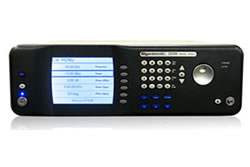
The Giga-tronics 2400 and 2500 Series Microwave Signal Generator Programming Manual (Part Number 34783, Rev A) documents the remote programming and automated test capabilities for the 2400 Series (models 2408C, 2420C, 2426C, 2440C) and 2500 Series (models 2508B, 2520B, 2526B, 2540B, 2550B) microwave signal generators. This manual covers hardware interface configuration, programming language selection, the Automation Xpress software application, and the complete command reference for SCPI, GT-12000 native, IEEE 488.2 common commands, and supported instrument emulation modes.
The manual is intended for engineers and test system integrators building automated measurement systems around the 2400/2500 Series. Documented applications include configuring the signal generator for CW output, programming list-mode frequency and power sweeps, integrating the instrument into LabVIEW-based test executives, and replacing legacy signal generators in existing automated test environments through the emulation command sets. The Automation Xpress application is positioned by the manual as the primary path for automated testing, providing GUI-based instrument control alongside an API delivered as a Dynamic Link Library.
ValueTronics International stocks and tests Giga-tronics 2400 and 2500 Series Microwave Signal Generators in our 20,000 square foot secure warehouse and test facility at 1675 Cambridge Drive in Elgin, Illinois. Every {{CONDITION}} signal generator we ship is handled by our in-house technical team rather than drop-shipped through a third-party warehouse, which means buyer questions about specific options, calibration records, or accessory contents are answered against the actual unit being prepared for shipment. The Giga-tronics 2400/2500 family has a substantial installed base in defense, aerospace, and semiconductor test environments, and our in-house experience with these instruments allows us to address technical questions about programming interfaces, emulation mode behavior, and option configurations before the purchase order is issued.
Giga-tronics Incorporated was founded in San Ramon, California and developed the 2400 and 2500 Series microwave signal generators as the successor product line to its earlier GT-12000 platform, which is why GT-12000 native command syntax is preserved as one of the selectable remote programming languages in the 2400/2500. Giga-tronics also positioned the 2400/2500 as a drop-in replacement for several legacy signal generators through its built-in emulation command sets.
This programming manual covers two distinct Giga-tronics microwave signal generator families documented together: the 2400 Series (models 2408C, 2420C, 2426C, 2440C) and the 2500 Series (models 2508B, 2520B, 2526B, 2540B, 2550B). The manual treats both families as sharing a common remote programming interface, command set, Automation Xpress software, and LabVIEW driver library, with model-specific differences appearing primarily in upper frequency range as reflected in each model number's frequency suffix.
Because the programming interface is documented as identical across the family, test scripts written against one model in the series will operate against other models in the series within their respective frequency capabilities. The manual's FM Sensitivity/Deviation Range Table (Appendix C) is organized by frequency band rather than by model, with maximum deviation scaling proportionally from 2 kHz (narrow) / 40 kHz (wide) at 10–15.99 MHz up to 8 MHz (narrow) / 160 MHz (wide) at 32.0–40.00 GHz.
Each pre-owned model in the 2400 and 2500 Series family is its own dedicated product page at ValueTronics with condition-matched pricing. Use the comparison table below to identify the specific model that matches your frequency-range requirement, then navigate to that model's page for pricing and the current condition grade available.
The numeric suffix in each model number within the 2400 Series (2408C, 2420C, 2426C, 2440C) and 2500 Series (2508B, 2520B, 2526B, 2540B, 2550B) reflects upper frequency coverage; the per-model maximum frequency, options, and detailed specifications should be confirmed from each model's individual specification documentation rather than from the programming manual, which intentionally treats the family as a single programming target.
The remote programming surface — SCPI command set, GT-12000 native commands, IEEE 488.2 common commands, DLL functions, LabVIEW drivers, and emulation modes — is documented as common to the entire family in this manual. Differences between the 2400 Series and 2500 Series in this context are primarily revision-level (the 2400 models carry a C suffix and the 2500 models carry a B suffix) rather than command-level.
| Model | Model | Series | Type |
|---|---|---|---|
| 2540B | 2540B | 2500 Series | Microwave Signal Generator |
| 2408C | 2408C | 2400 Series | Microwave Signal Generator |
| 2420C | 2420C | 2400 Series | Microwave Signal Generator |
| 2426C | 2426C | 2400 Series | Microwave Signal Generator |
Additional differences in specifications beyond the few shown above are not listed here — see each model's full specifications below.
| Specification | Value |
|---|---|
| Equipment Type | Microwave Signal Generator |
| Remote Interfaces | GPIB (IEEE 488.2), LAN (Ethernet), RS-232, USB 2.0 (full speed) |
| RS-232 Baud Rate | 115200 |
| RS-232 Data Bits | 8 |
| RS-232 Parity | None |
| RS-232 Stop Bits | 1 |
| RS-232 Handshake | None |
| Supported Programming Languages | SCPI, GT-12000 Native, IEEE 488.2 Common Commands |
| Emulation Modes | HP 834X, HP 8663, HP 8673, HP 8360, HP 8370, GT900, Wavetek 90X (Option 55F), Systron Donner 16XX |
| EMC Directive | 89/336/EEC |
| Low Voltage Directive | 73/23/EEC |
| Electrical Safety Standard | EN61010-1 (1993) |
| EMC Standard | EN61326-1 (1997) |
| Warranty | One year from date of shipment |
Please review the Manufacturer's Data Sheet to verify published specifications. Feedback on this webpage is always welcome — please reach out to your Test Architect at any time for questions or concerns. Thank you, we truly appreciate you being our customer.
Model No
Giga-tronics
Condition
Used
Manufacturer
Gigatronics
Frequency
40 GHz


30+ Years in Business

Secure Payments

Sell Test Equipments

Knowledgeable Staff

On-site Lab
30+ Years in Business
Secure Payments
Sell Test Equipments
Knowledgeable Staff
On-site Lab
Request A Quote